
概要
现象
开机HDMI无信号
TTL提示GXL:BL1:9ac50e:bb16dc;FEAT:BDFC31BC:0;POC:3;RCY:0;EMMC:800;NAND:81;SD:800;US
连接公对公USB后直接进入了刷机模式
刷T1包卡在7%,提示[0x32030201]UBOOT/获取返回/DiskInitial命令出错
解决方案
可能是EMMC损坏,通过USB加载UBOOT,并通过U盘启动系统
前言
我在很久之前买了个N1盒子,主要是用来搞易班的自动签到,后来一直发现系统会时不时卡死,只有重启才能好,我一直都没有在意。直到某一天,它彻底死了,再也无法启动。具体现象为
开机HDMI无信号
TTL提示GXL:BL1:9ac50e:bb16dc;FEAT:BDFC31BC:0;POC:3;RCY:0;EMMC:800;NAND:81;SD:800;US..,后续LOOP:1B;EMMC:800;NAND:81;SD:800;USB:8循环。
连接公对公USB后直接进入了刷机模式
刷T1包卡在7%,提示[0x32030201]UBOOT/获取返回/DiskInitial命令出错
根据网上的知识,我了解到
GXL:BL1:9ac50e:bb16dc;FEAT:BDFC31BC:0;POC:3;RCY:0;EMMC:800;NAND:81;SD:800;US.., 指的是BL1无法启动emmc上面的BL2以及后续bootloader。我也猜到了是emmc损坏。
无意中发现在使用USB Burning Tool进行烧录的时候,通过TTL看到竟然进入了UBoot。
U-Boot 2015.01-dirty (Dec 22 2017 - 10:20:14)
DRAM: 2 GiB
Relocation Offset is: 76eb8000
[MSG]MMC init in usb
aml_priv->desc_buf = 0x0000000073eb8640
aml_priv->desc_buf = 0x0000000073eba960
...
于是我就想到,能不能通过USB启动UBoot,然后通过UBoot启动U盘中的系统。
解决方案
工具
硬件
可以引导的U盘,比如刻录了ophub的u盘
USB公对公数据线
TTL转USB串口
软件
T1 刷机包
USB Burning Tool
进入UBoot命令行
正常情况下,USB Burning Tool加载UBoot后会使得N1进入烧录模式,而无法通过TTL与其交互。所以我们需要阻止其进入烧录模式。
我们先拆开N1的外壳,这一部分教程很多,就不再赘述。
我们连接好TTL串口,公对公数据线,打开USB Burning Tool,加载T1包。点击开始烧录。
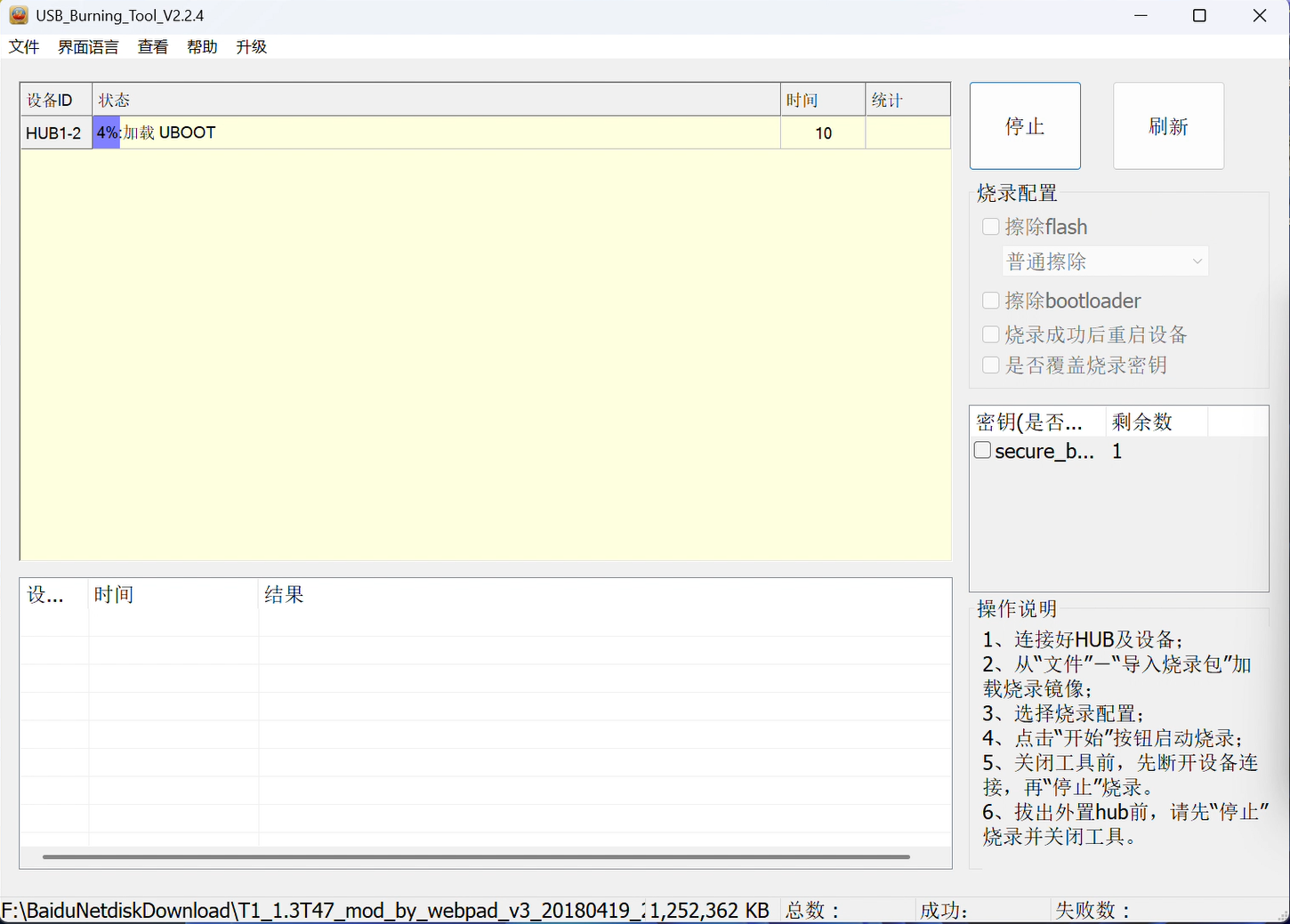
等到TTL显示
U-Boot 2015.01-dirty (Dec 22 2017 - 10:20:14)
DRAM: 2 GiB
Relocation Offset is: 76eb8000
[MSG]MMC init in usb
aml_priv->desc_buf = 0x0000000073eb8640
aml_priv->desc_buf = 0x0000000073eba960
SDIO Port B: 0, SDIO Port C: 1
但是没有显示
InUsbBurn
的时候,移除USB公对公数据线。
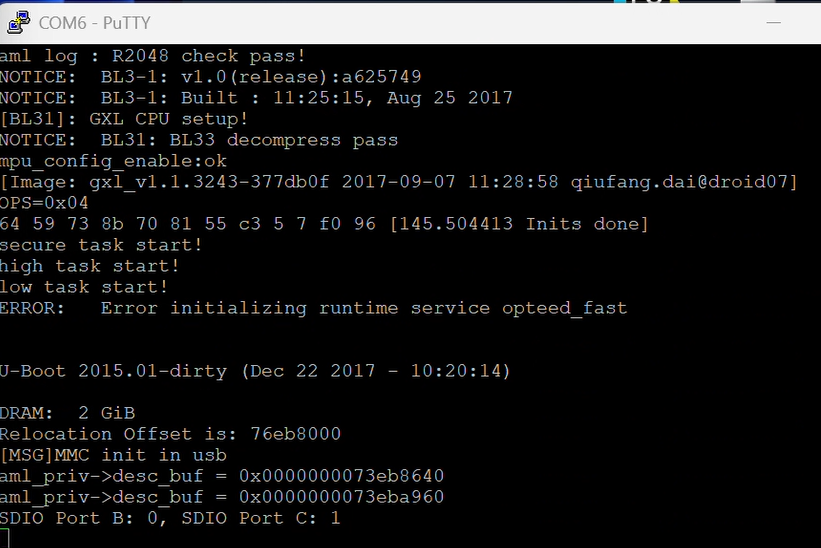 稍等片刻,应该可以进入UBoot命令行。
从提示符可以看出,这是T1的UBoot。
启动系统
为了从UBoot启动,我们需要先探测U盘。
先插入U盘到N1盒子,然后在TTL输入
usb reset如果正常的话,应该会显示探测到的usb设备
gxm_q201_v1#usb reset
Host not halted after 16000 microseconds.
(Re)start USB...
USB0:   USB3.0 XHCI init start
Register 2000140 NbrPorts 2
Starting the controller
USB XHCI 1.00
scanning bus 0 for devices... 2 USB Device(s) found
       scanning usb for storage devices... init_part() 278: PART_TYPE_DOS
1 Storage Device(s) found但是我在这一步没有成功探测到U盘,我需要重新插入USB公对公数据线,然后再次尝试,才能探测到,可能是供电的原因,我也不是很清楚。
然后使用fatls命令,列出U盘下面的文件
gxm_q201_v1#fatls usb 0:1 /
      709   aml_autoscript
      637   aml_autoscript.cmd
     1536   armbian_first_run.txt.template
      953   boot-emmc.cmd
      571   boot-emmc.ini
     1025   boot-emmc.scr
    38518   boot.bmp
     1051   boot.cmd
      589   boot.ini
     1123   boot.scr
            dtb/
      831   emmc_autoscript
      759   emmc_autoscript.cmd
            extlinux/
     1351   s905_autoscript
     1279   s905_autoscript.cmd
   709768   u-boot.sd
   709768   u-boot.usb
      385   uenv.txt
   704408   u-boot-e900v22c.bin
   757153   u-boot-gtking.bin
   735459   u-boot-gtkingpro-rev-a.bin
   757080   u-boot-gtkingpro.bin
   702771   u-boot-n1.bin
   761012   u-boot-odroid-n2.bin
   553489   u-boot-p201.bin
   606670   u-boot-p212.bin
   633376   u-boot-r3300l.bin
   609247   u-boot-s905.bin
   650183   u-boot-s905x-s905lb.bin
   646455   u-boot-s905x-s912.bin
   851352   u-boot-s905x2-s922.bin
   798672   u-boot-s905x3.bin
   754378   u-boot-sei510.bin
   754384   u-boot-sei610.bin
   880672   u-boot-skyworth-lb2004.bin
   758664   u-boot-tx3-bz.bin
   759112   u-boot-tx3-qz.bin
   694755   u-boot-u200.bin
   877080   u-boot-ugoos-x3.bin
   748175   u-boot-x96max.bin
   746678   u-boot-x96maxplus.bin
   703444   u-boot-zyxq.bin
  6224354   system.map-6.1.158-ophub
   230332   config-6.1.158-ophub
 12348024   initrd.img-6.1.158-ophub
 12348088   uinitrd-6.1.158-ophub
 38461952   vmlinuz-6.1.158-ophub
 12348088   uinitrd
 38461952   zimage
            system volume information/

48 file(s), 3 dir(s)
随后使用fatload加载新的N1的UBoot。
gxm_q201_v1#fatload usb 0:1 0x1000000 u-boot-n1.bin
reading u-boot-n1.bin
702771 bytes read in 67 ms (10 MiB/s)
然后启动它
gxm_q201_v1#go 0x1000000
## Starting application at 0x01000000 ...


U-Boot 2021.07-rc3-00183-gd6e1cdad51-dirty (Jun 02 2021 - 22:40:27 +0800) phicomm-n1

Model: Phicomm N1
SoC:   Amlogic Meson GXL (S905D) Revision 21:d (4:2)
DRAM:  2 GiB
MMC:   mmc@70000: 0, mmc@74000: 1
Loading Environment from nowhere... OK
In:    serial
Out:   serial
Err:   serial
[BL31]: tee size: 0
[BL31]: tee size: 0
Net:   eth0: ethernet@c9410000
starting USB...
Bus usb@c9000000: dwc3_meson_gxl_get_phys: usb2 ports: 2
Register 2000140 NbrPorts 2
Starting the controller
USB XHCI 1.00
scanning bus usb@c9000000 for devices... 2 USB Device(s) found
       scanning usb for storage devices... 1 Storage Device(s) found
Hit any key to stop autoboot:  0
UBoot可能会自动启动系统,也可能不会,但是无论如何,到这一步再去启动系统都比较简单了。